歡迎使用 FlexiSPY!以下是 Premium 的設定方式
保護你的 Account
- 將你的使用者名稱和密碼更新為容易記住的內容
- Account > Username / Password > Edit
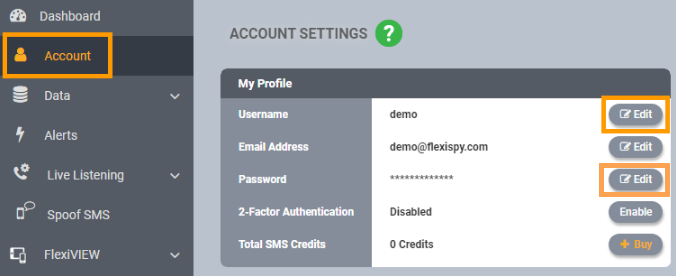
- 啟用雙重驗證(2FA)
Account > 2-Factor Authentication > Enable
設定核心功能
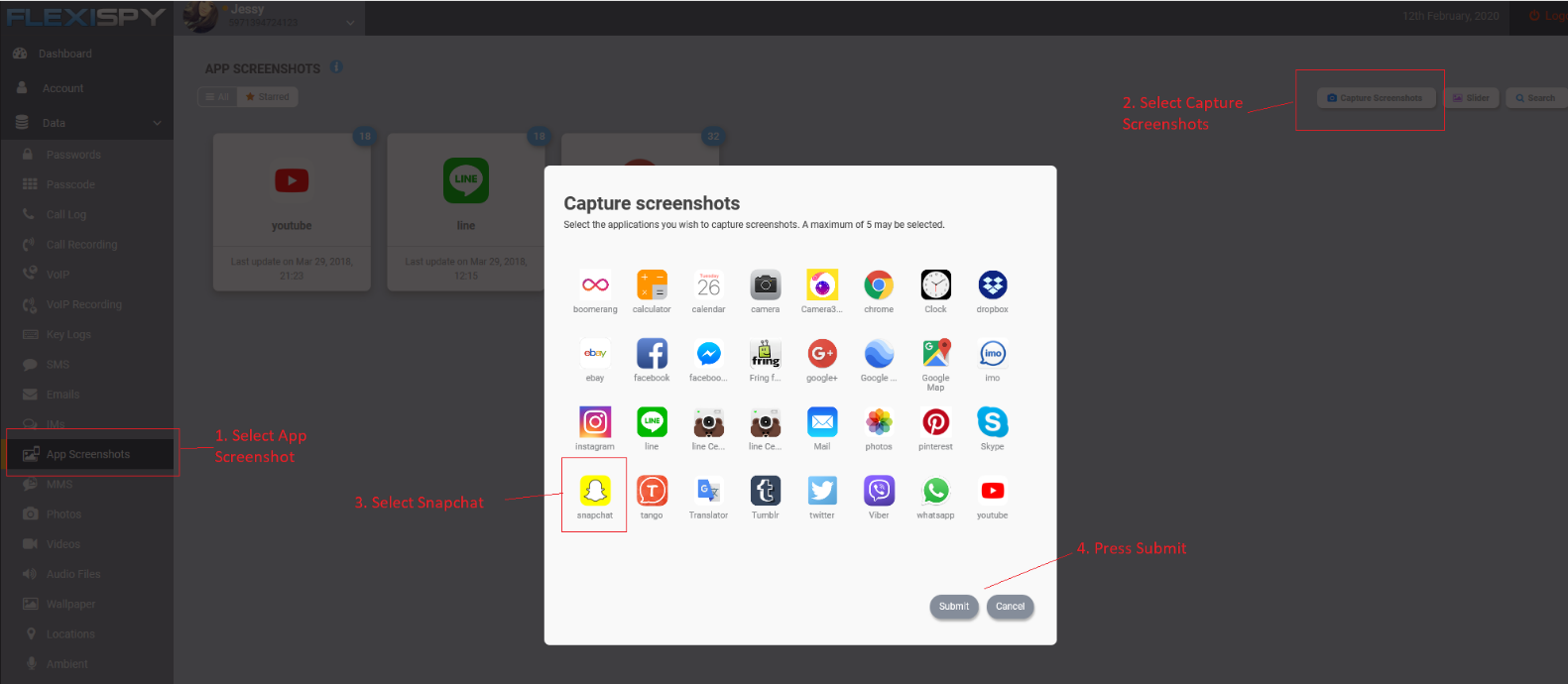
- 設定 App Screenshots
- Data > App Screenshots > Capture Screenshots > Select App > Submit
- 設定 Alerts
- 在這裡了解更多。
- 設定 Location 追蹤
- 在這裡了解更多。
- Geo-Fencing
- 請參考上方的「Set up Alerts」
- 另一種方式是使用 FlexiVIEW app。 在這裡了解更多。
- 設定 Daily Summary Report Email
Reports > 將 Daily Summary ON 或 OFF
下載 FlexiVIEW
- 依照這裡的指示下載並安裝 FlexiVIEW